From menu to till, your restaurant in one system.
QRordine connects the QR menu, table ordering, the kitchen display, the till and the management dashboard. Guests order from their phone, the kitchen sees it at once, the bill is settled at the till, and you follow revenue through the day.
- Free product walkthrough
- Setup and staff training included
- No commission on your sales
Five things that get lost in a busy service
Paper tickets, verbal orders and screens that don't talk to each other. QRordine ties them into one flow.
Scattered orders
Orders live in the waiter's notepad, some passed on by word of mouth; at peak hours a table gets forgotten.
Orders reach the kitchen in writing, from the table or the waiter's phone; notes arrive exactly as written.
Out-of-date menu
Prices changed but the printed menu and the QR list don't match; sold-out dishes still get ordered.
Change a price or stock in the dashboard and the menu updates at once. Switch off a sold-out item with one tap.
Kitchen and till out of sync
The kitchen asks what's been paid, the till asks what's ready.
When the kitchen marks an order ready, the till and waiter see it; the bill builds itself from the orders.
Commission-based platforms
Every delivery order hands a percentage to the platform, and the guest data stays there.
QRordine takes no share of your revenue; the subscription is fixed. Your own QR and pick-up orders, your own guest records.
Unclear end-of-day numbers
What sold and which hour was busy gets pieced together from notes at closing.
Revenue, top sellers, hourly load and waiter performance are visible in the dashboard during the day.
The path of an order
From the moment a guest scans the table QR to the moment the bill is closed, every step happens in one system. Tap a step to see the real screen.
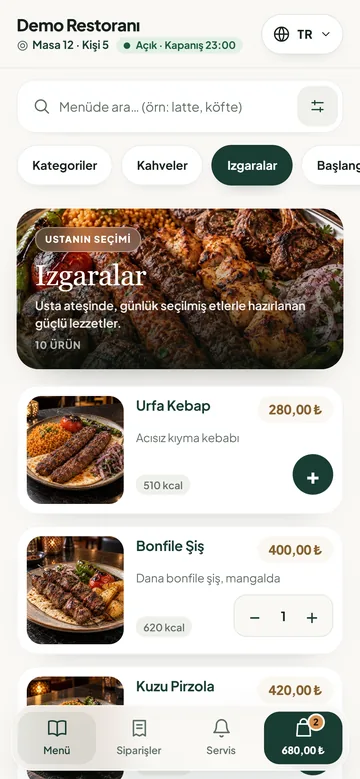
Scanning the table QR opens a menu for that table
No app to install, no sign-up. Everyone at the table adds from their own phone, and the system keeps track of who ordered what.
- Table name on screen; the order goes onto that table's bill
- Shows whether the restaurant is open and when it closes
- Call a waiter or ask for the bill with one tap; the call goes to the waiter's phone
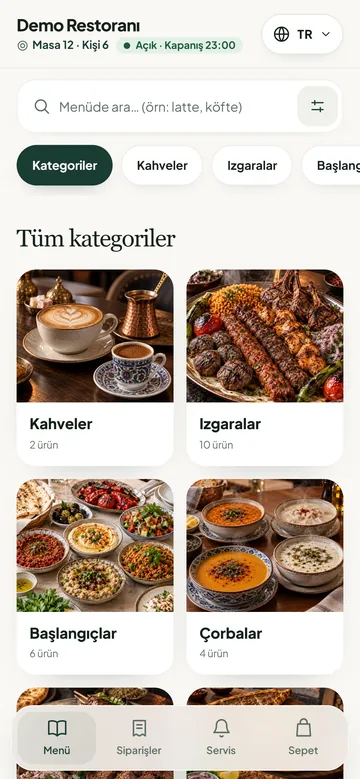
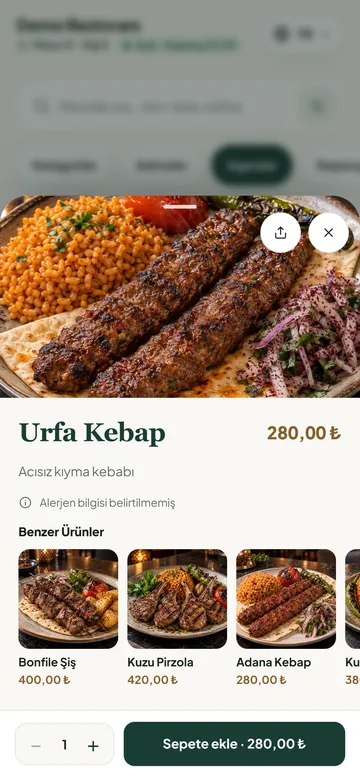
Photos, descriptions, calories and options make choosing easier
Size, extras and sauces sit on the product page. Similar dishes are suggested, and the order note reaches the kitchen as written.
- Required choices are checked before sending
- The price is recalculated on the server for every order
- If the connection drops, the order waits on the device and goes out when it's back
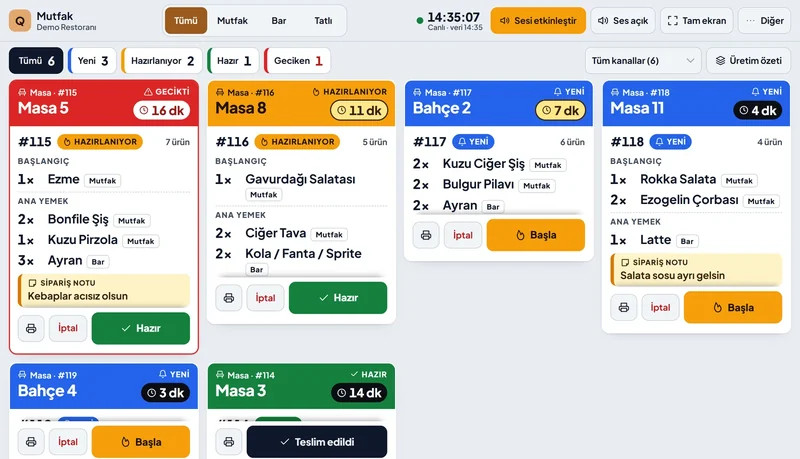
The order lands on the kitchen display with a sound alert
Each ticket shows the table, order number and waiting time. Late orders turn red. Waiter calls never distract the kitchen; they go straight to the waiter's phone.
- A table's orders on one ticket, in the order they arrived
- New, preparing, ready and late filters
- Kitchen, bar and dessert station split (Enterprise)
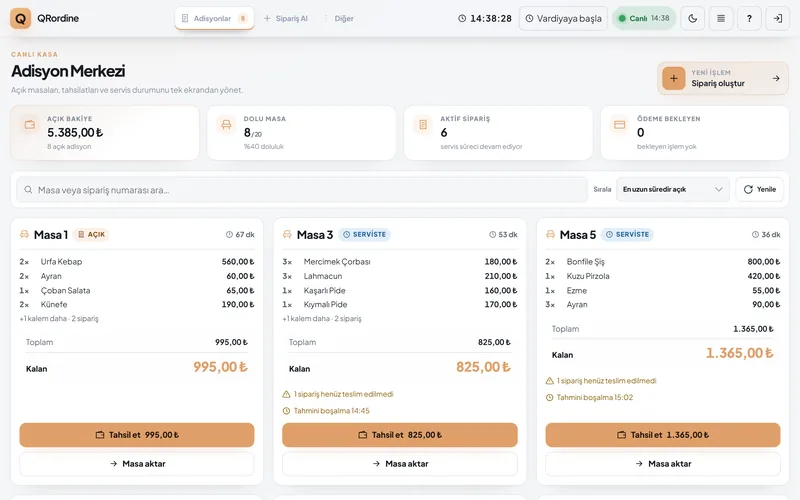
Open bills, balance due and payment on one screen
The till sees each table's orders, total and remaining balance. Cash, the card terminal, meal cards and online payment from the table all go onto the same bill.
- Split the bill equally, per person or by item
- Move a table and take quick counter sales
- Thermal receipt printer and cash drawer
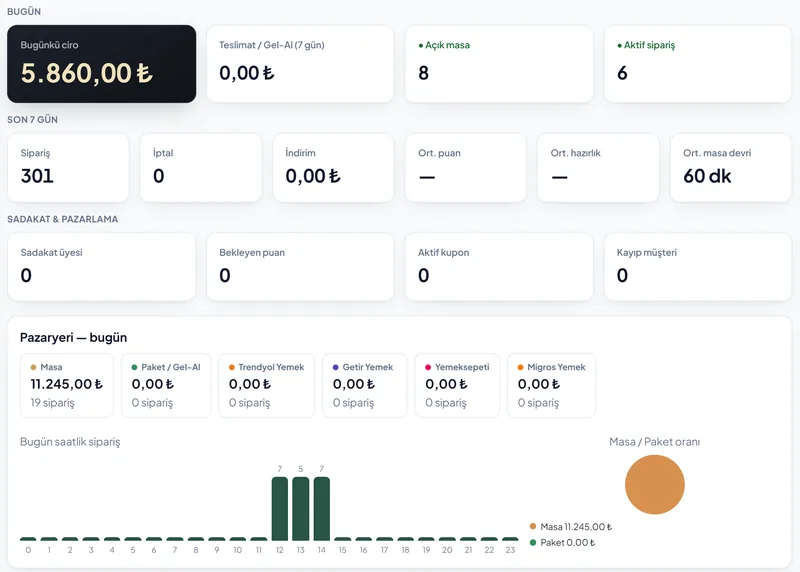
Today's revenue and the state of the venue, wherever you are
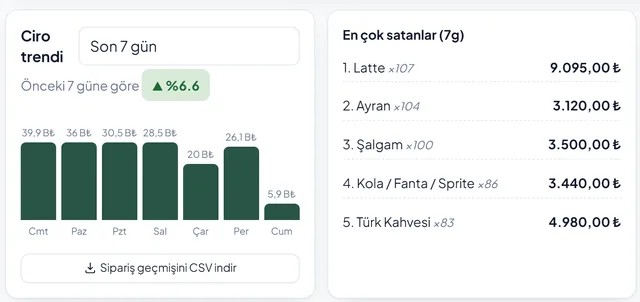
The dashboard shows revenue, open tables, active orders, payment methods and a 7-day trend. Menu, tables, staff and campaigns are managed there too.
- Today's revenue and payment mix
- Top sellers and hourly load
- Waiter performance and table turnover time

Try the menu on your phone
Point your camera at the QR or open the link. It is the demo restaurant's real menu; orders placed there don't reach a kitchen.
The screens a restaurant needs, connected
Each team works on its own screen; the data lives in one place. The label shows the plan a feature starts in.
QR menu
A menu with photos, allergens and calories. Price and stock changes go live instantly.
All plansTable ordering
Guests order from their phone, waiters from their own screen. Guests can follow the order status.
Starter and upKitchen display
Sound alert for new orders, waiting time, one ordered ticket per table and ready notice.
Starter and upTill and bills
Open table list, bill splitting, mixed payments, quick sales, shifts and cash-up.
Starter and upManagement and reports
Revenue, top sellers, hourly load, staff and stock. Order history downloads as CSV.
Starter and upLoyalty and campaigns
Points and tiers, coupons, Happy Hour, gift cards and win-back messages for guests who haven't returned.
Professional and upIntegrations
Online payment to your own iyzico account, optional e-document connection, marketplace orders and accounting export.
Professional and EnterpriseMulti-branch
Switch between branches with one login, branch-level permissions and comparison reports.
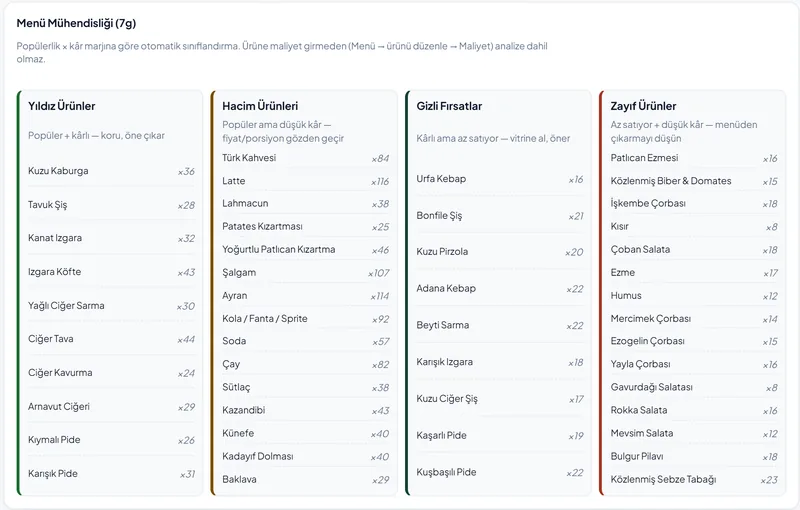
EnterpriseThe numbers you need to decide
A seven-day revenue trend, top-selling items, and products grouped by profitability and sales volume.
Built around how your venue works
Restaurant
One ticket per table, orders in sequence; table moves, bill splitting and reservations.
Café
Table ordering and payment for fast turnover; loyalty points, coupons and Happy Hour.
Fast food
Guests order and pay from the table themselves and see on their phone when it's ready. Quick sales at the till.
Bakery
Quick counter sales, one-tap sold-out for display items, and gift cards.
Multi-branch business
One login across branches, branch-level permissions and a report comparing them.
How we protect your money and your data
Totals are calculated on the server
The amount on the phone is never trusted; price, discount and points are recalculated from the database for every order. If a price has changed, the guest sees and confirms the new total.
Card data never reaches us
Online payment is taken on the secure form of a licensed payment institution (iyzico); the card number never reaches the QRordine server.
Records are not deleted
Orders, payments and key actions are never deleted; removed products or staff are deactivated. Key actions are written to an activity log.
Role-based access
Managers, cashiers, waiters and kitchen staff work with separate permissions. A departing employee's access is revoked instantly in one step.
If the connection drops
If the internet goes out briefly, the order waits on the device and is sent once the connection returns, without creating a duplicate.
Personal data
What we process, why, who we share it with and how to exercise your rights are set out on our legal pages (Turkish).
Our Founding Venue Programme is open. One-to-one setup, close support on your first service and a direct line to the founding team for the first 5 venues. See the programme.
A fixed monthly subscription, no share of revenue
Setup, menu entry, table QR codes and staff training are included in every plan. Monthly billing has no commitment; pay yearly and get 2 months free.
QR Menu only
Venues that don't take orders but want an always up-to-date digital menu
+ VAT / month
Paid yearly:
- QR menu with photos
- QR code per table
- Calories and allergens
Starter
Venues that want table ordering, the kitchen display and the till together
4,900 ₺ + VAT / month
Paid yearly: 49,000 ₺ + VAT
- Unlimited tables and orders
- Kitchen display and till
- Bill splitting and online payment
Professional
Venues that want to bring guests back and run campaigns and reservations
9,900 ₺ + VAT / month
Paid yearly: 99,000 ₺ + VAT
- Everything in Starter
- Loyalty, coupons and Happy Hour
- Reservations and stock tracking
Enterprise and multi-branch
A custom quote based on your number of branches and integration scope.
20% Turkish VAT is added to all prices.
QRordine takes no commission on sales. For online payments, the payment institution's (iyzico) transaction fee applies separately.
SMS and AI product images are billed per use.
Before you decide
How long does setup take?
Usually the same day if your menu is ready. We enter the menu and tables; QR cards, the kitchen display and the till tablet are connected on site, and your team is shown how it works on a live order.
What devices do I need?
One tablet or your existing computer each for the kitchen and the till. Guests don't need to install an app. A thermal receipt printer is optional.
Is a QR menu legally required in Türkiye?
Not on its own. Under the Turkish Price Tag Regulation, price lists must be at the entrance and on the tables; the table list may also be shown by QR code, but a price list must still be given to any guest who asks. QRordine keeps the QR price identical to the till price.
Do I have to drop my current POS?
Not right away. If you like, both systems can run side by side during the switch; menu and table data are carried over at setup.
Is there a minimum contract?
Monthly billing has no commitment; you can stop in any month. Yearly billing gives 2 months free and a fixed price for 12 months.
Send us your menu, we'll handle the setup.
In a 15-minute call we'll pick the right plan and a setup day together. We run on-site demos in Ankara.